Key icon on Android screen: what it means and how to manage it
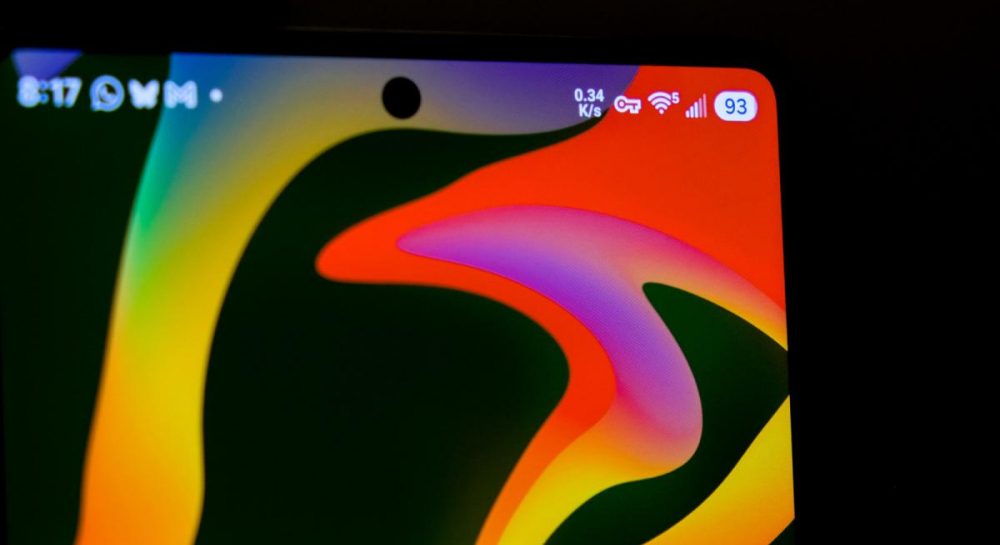
The appearance of a key icon in the Android status bar often confuses users. We explain why this indicator appears and what it means for your digital security.
 💡Tech
Photo: UNIAN
Key points
- Key indicates active VPN
- Sign of encrypted connection
- Remove by disabling VPN
Android smartphone users frequently notice an unfamiliar key-shaped symbol in the status bar. It is important to understand that this indicator is not a sign of a technical malfunction or unauthorized access to your device.
What the key icon means
The appearance of the key icon indicates that a VPN service is active on your smartphone. This technology creates an encrypted tunnel for data transmission, which helps hide your real IP address and protects your information when using public Wi-Fi networks.
As long as the icon is displayed, your internet traffic is routed through a secure connection. If the icon disappears, it means the VPN connection has been interrupted, and your data is no longer being encrypted.
Can you remove this indicator?
In most cases, Android developers do not allow users to hide this icon, as it serves as a persistent visual confirmation of your security status. An exception is Samsung Galaxy devices, where the Good Lock app can be used to customize the notification panel.
The simplest way to remove the icon is to deactivate the VPN service itself within your phone's settings or the specific application you are using for traffic encryption.
Source UNIAN — unian.ua/techno/gadgets/znachok-klyucha-u-paneli-na-android-za-shch… ↗
Read next
 🎓Education
Danish Government Plans Nationwide School Smartphone Ban Following Record Low PISA Scores
Denmark prepares legislation to ban smartphones in schools up to the 10th grade in response to historically poor student performance data.
 🇺🇦Ukraine
Kremlin's Renewed Nuclear Threats: Medvedev Outlines Conditions for WMD Use
Dmitry Medvedev has once again threatened a preemptive nuclear strike against Ukraine, attempting to justify the ongoing invasion through geopolitical narratives.
 🇺🇦Ukraine
EU Responds to Putin's Moscow Invitation, Prioritizing Multilateral Peace Talks
The European Commission acknowledges the invitation from Moscow but insists on a broad diplomatic format involving NATO and EU allies only after a ceasefire.
 🏛️Politics
SAP Prosecutor Praises NABU Media Team Amid Criticism Over Investigation Quality
SAP prosecutor Rostyslav Batih responded to allegations of weak evidence in anti-corruption cases by highlighting the professional skills of NABU's video editing staff.
 🛡️Security
DTEK energy workers restore power to 3.5 million households following shelling
Over the past week, DTEK specialists have restored electricity to more than 1,800 settlements across Ukraine affected by enemy attacks.
 🩺Health
Two Peaks of Aging: Scientists Identify Critical Ages for Immune System Decline
A new study reveals that human immunity does not age gradually but undergoes rapid shifts at approximately 40 and 60 years of age.